How to Use AI for LinkedIn Without Sounding Like a Robot (2026 Guide)
Table of Contents
What Is AI for LinkedIn?
Why Most LinkedIn Outreach Fails
Why AI for LinkedIn Works Better Than Cold Outreach
AI for LinkedIn Research Framework
Step 1: Research Before You Reach Out
Step 2: Add Value Before Asking for Anything
Step 3: Start Conversations Naturally
Step 4: Follow Up Like a Human
Step 5: Let AI Organize Your Relationships
AI Should Enhance Your Voice—Not Replace It
Common AI for LinkedIn Mistakes
AI Prompts You Can Use Today
15-Minute AI for LinkedIn Daily Routine
Frequently Asked Questions About AI for LinkedIn
Final Thoughts
What Is AI for LinkedIn?
AI for LinkedIn is changing how professionals build relationships, grow their networks, and create new business opportunities. Whether you’re a business owner, marketer, recruiter, freelancer, or entrepreneur, artificial intelligence can help you work smarter—not by replacing human interaction, but by enhancing it.
The challenge isn’t using AI.
The challenge is using it in a way that still feels authentic.
Too many people ask ChatGPT to write connection requests, copy and paste generic messages, and wonder why nobody responds. Instead of building relationships, they end up sounding like everyone else using AI.
The problem isn’t AI.
The problem is using AI to replace relationships instead of strengthening them.
When used correctly, AI becomes your research assistant, brainstorming partner, writing coach, and follow-up system. It helps you understand people before reaching out, craft thoughtful comments, personalize conversations, and remember important details—all while keeping your own personality and voice.
In this guide, you’ll learn a practical framework for using AI to build genuine relationships on LinkedIn without sounding robotic.
Why Most LinkedIn Outreach Fails
LinkedIn isn’t failing.
Most outreach strategies are.
Every day, professionals receive connection requests that look almost identical.
“Hi John, I’d love to connect.”
Five minutes later…
“Thanks for connecting! We help businesses increase revenue by…”
Delete.
Ignore.
Move on.
The biggest mistake people make is treating LinkedIn like a sales database instead of a networking platform.
Successful professionals understand that relationships come before revenue.
Here are the most common mistakes that hurt LinkedIn engagement:
- Sending generic connection requests
- Mass messaging without personalization
- Pitching too early
- Leaving low-value comments like “Great post!”
- Never following up
- Sounding robotic because every message came directly from AI
People don’t build trust with templates.
They build trust through genuine conversations.
The New LinkedIn Formula
Instead of thinking:
Pitch → Ignore
Think:
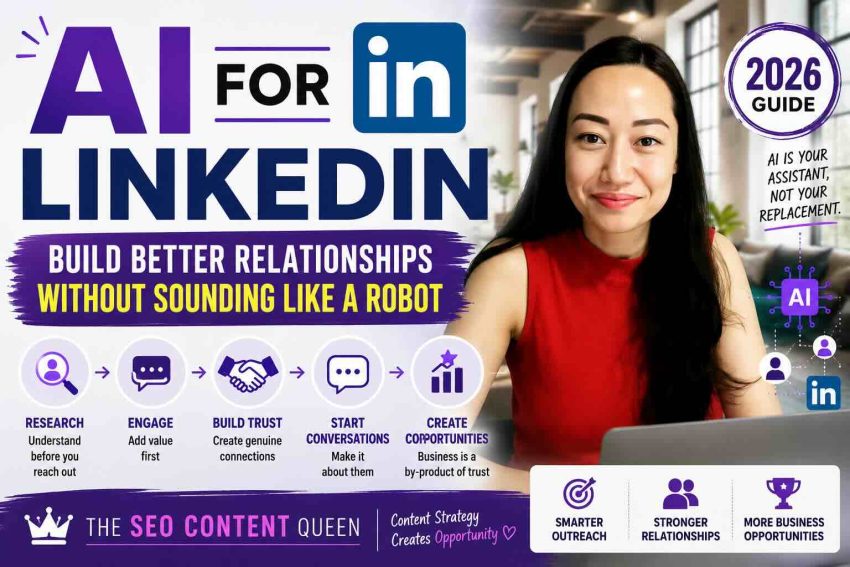
Research → Engage → Build Trust → Start Conversations → Create Opportunities
Every successful LinkedIn relationship follows this pattern.
You research someone’s interests.
You engage with their content.
You build familiarity over time.
Then conversations happen naturally.
Business often becomes a by-product of trust.
AI simply helps you execute this process faster and more consistently.
Step 1: Research Before You Reach Out
One of AI’s greatest strengths is helping you understand people before contacting them.
Instead of sending blind messages, spend a few minutes learning about the person.
Research:
- Their recent LinkedIn posts
- Career journey
- Company
- Website
- Podcast interviews
- Articles they’ve written
- Mutual interests
- Shared connections
- Recent achievements
- Industry challenges
The more context you have, the more meaningful your conversation becomes.
AI Prompt
Analyze this LinkedIn profile. Identify the person’s interests, recent achievements, expertise, likely business goals, and three conversation starters that feel natural rather than sales-focused.
AI Prompt
Summarize this person’s last five LinkedIn posts and identify recurring themes they care about.
Instead of starting with your offer…
Start with curiosity.
People appreciate being understood.
Step 2: Add Value Before Asking for Anything
One thoughtful comment is often worth more than ten cold messages.
Most LinkedIn comments are forgettable.
- Great post!
- Nice!
- Love this.
- Totally agree.
These comments don’t create conversations.
Instead, contribute something meaningful.
You might:
- Share a related experience.
- Add another perspective.
- Expand on one of their ideas.
- Ask a thoughtful question.
- Recommend a useful resource.
For example…
Instead of:
Great post!
Try:
Your point about topical authority really stood out. We’ve seen the same thing with long-form evergreen content. Publishing fewer, higher-quality articles consistently outperforms pumping out short posts every day.
That comment shows you’ve actually read the content.
People notice.
AI Prompt
Read this LinkedIn post and help me write a thoughtful comment that adds value without sounding promotional.
Step 3: Start Conversations Naturally
Once you’ve engaged with someone’s content several times, reaching out feels much more natural.
Avoid opening with:
I help businesses generate more leads.
Instead…
Reference something you’ve already learned.
For example:
Hi Sarah, I enjoyed your recent post about building remote teams. Your point about documenting processes instead of relying on meetings really resonated with me. Curious—what’s been the biggest challenge as your team has grown?
Notice what’s missing.
No sales pitch.
No agenda.
Just genuine curiosity.
That’s how relationships begin.
AI Prompt
Write a conversational LinkedIn message based on this person’s recent content. Make it friendly, authentic, and focused on starting a discussion rather than selling.
Step 4: Follow Up Like a Human
Most opportunities aren’t lost because someone said “no.”
They’re lost because nobody followed up.
Many professionals assume that if they don’t receive a reply within a few days, the conversation is over. In reality, people are busy. They travel, attend meetings, take vacations, and sometimes simply miss notifications.
Following up isn’t annoying when it’s done with relevance and respect.
The key is to avoid sending messages that only ask, “Just checking in…”
Instead, give people a reason to continue the conversation.
Here are a few examples:
❌ Don’t say:
Just following up.
✅ Instead say:
Hi David! I came across this article on AI adoption in manufacturing and immediately thought of our conversation last week. I figured you’d find it interesting.
Or:
Congratulations on launching your new website! I remembered you mentioning that project a few weeks ago. It looks fantastic.
Notice the difference.
Each follow-up adds value instead of demanding attention.
Think of every follow-up as another opportunity to strengthen the relationship—not to push a sale.
AI Prompt
Based on this previous LinkedIn conversation, write a friendly follow-up message that adds value and gives the recipient a reason to reply. Keep it conversational, concise, and non-salesy.
Step 5: Let AI Organize Your Relationships
Building relationships isn’t just about starting conversations.
It’s about remembering people.
Think about how meaningful it feels when someone remembers:
- Your business goals
- Your children’s names
- Your favorite hobby
- A project you mentioned months ago
- A conference you were planning to attend
- A challenge you were trying to solve
These small details create trust.
Instead of relying on memory alone, use AI to organize your networking notes.
You can keep track of:
- Company
- Industry
- Job title
- Mutual connections
- Shared interests
- Personal milestones
- Business goals
- Previous conversations
- Recommended resources
- Next follow-up date
The goal isn’t to collect contacts.
The goal is to build meaningful relationships over time.
AI Prompt
Organize these LinkedIn conversation notes into a relationship profile that includes interests, business goals, previous conversations, follow-up ideas, and suggested future discussion topics.
AI Should Enhance Your Voice—Not Replace It
One of the biggest mistakes professionals make is publishing AI-generated content without editing it.
People can often recognize when a message feels generic or overly polished.
Your network connected with you, not an AI assistant.
That means every message should still sound like something you would naturally say.
AI is excellent at generating ideas, improving grammar, organizing thoughts, and brainstorming different ways to express a message.
But it shouldn’t replace your personality.
A simple rule to follow is this:
Use AI to create the first draft. Let your personality create the final draft.
Before sending any message, ask yourself:
- Would I actually say this?
- Does this sound natural?
- Is this how I normally write?
- Does it reflect my personality?
If the answer is no, keep editing.
Authenticity is still your biggest competitive advantage.
The Human-First AI Framework
Whenever you use AI on LinkedIn, remember this simple sequence:
Research → Personalize → Add Value → Build Trust → Continue the Conversation
Notice that selling isn’t part of the framework.
Sales become much easier once trust has already been established.
People prefer doing business with people they know, like, and trust.
AI simply helps you get there more efficiently.
Common Mistakes to Avoid
Even with powerful AI tools, there are habits that can undermine your credibility.
Avoid these common mistakes:
1. Copying AI Responses Word for Word
AI should help you write—not replace your voice.
Always personalize before sending.
2. Commenting Without Reading the Post
Readers can tell when someone only skimmed the headline.
Read first.
Then contribute something meaningful.
3. Pitching Too Early
The fastest way to lose a potential relationship is to immediately sell.
People buy from people they trust.
Trust comes first.
4. Forgetting to Follow Up
Relationships aren’t built in one interaction.
Consistency matters more than intensity.
5. Treating LinkedIn Like a Lead List
LinkedIn is a professional networking platform—not a cold email database.
Approach people with curiosity rather than an agenda.
6. Sounding Like Every Other AI User
If your messages feel generic, people will ignore them.
Edit until your personality shines through.
7. Automating Trust
You can automate reminders.
You can automate research.
You can automate note-taking.
But you cannot automate genuine human connection.
Relationships always require authenticity.
AI Prompts You Can Use Today
Here are some practical prompts you can use immediately.
Research a Profile
Analyze this LinkedIn profile. Summarize their expertise, interests, recent accomplishments, and suggest three personalized conversation starters.
Write a Better Comment
Help me write a thoughtful LinkedIn comment that expands on this post and encourages discussion without promoting myself.
Personalize a Connection Request
Write a short LinkedIn connection request based on this person’s recent post. Keep it warm, authentic, and under 300 characters.
Write a Follow-Up
Based on this previous conversation, write a follow-up message that adds value and feels natural rather than sales-focused.
Summarize a Conversation
Summarize this LinkedIn conversation into key relationship notes, interests, goals, and recommended follow-up actions.
Brainstorm Conversation Starters
Based on this person’s profile and recent activity, suggest five thoughtful conversation starters that are likely to receive a response.
A Simple 15-Minute AI for LinkedIn Routine
One of the biggest advantages of AI for LinkedIn is that it helps you stay consistent without spending hours networking every day.
Instead of logging in only when you need clients or a new opportunity, make LinkedIn a daily habit.
Here’s a simple routine that takes just 15 minutes.
Minutes 1–5: Research Two People
Use AI for LinkedIn to review two profiles.
Look at:
- Their recent posts
- Career journey
- Company updates
- Shared interests
- Mutual connections
Take notes about potential conversation starters.
Minutes 6–10: Leave Thoughtful Comments
Instead of scrolling mindlessly, add value to three posts.
Ask a question.
Share a relevant experience.
Expand on one of their ideas.
Avoid generic comments that don’t contribute to the discussion.
Minutes 11–15: Send One Personalized Message
Reach out to someone you’ve recently engaged with.
Reference something specific they shared.
Keep the conversation natural.
The goal isn’t to sell.
The goal is to build another relationship.
Do this consistently, and you’ll build a network that compounds over time.
Frequently Asked Questions About AI for LinkedIn
Is AI for LinkedIn allowed?
Yes. LinkedIn doesn’t prohibit using AI to help write content, brainstorm ideas, or organize your workflow. However, avoid spam, automation that violates LinkedIn’s terms, or mass-generated messages that diminish the user experience.
Will people know I’m using AI?
Only if you let them.
Most AI-generated content sounds generic because people publish it without editing.
The best AI for LinkedIn strategy is using AI as a drafting assistant while ensuring every message reflects your personality and experience.
Can AI write LinkedIn messages?
Absolutely.
AI can help you:
- Draft connection requests
- Improve grammar
- Rewrite messages
- Brainstorm conversation starters
- Personalize outreach
- Summarize profiles
- Generate follow-up ideas
The final message should always sound like you.
Can AI help me grow on LinkedIn?
Yes.
AI for LinkedIn can make you more consistent by helping you research people faster, generate thoughtful comments, organize networking notes, and maintain regular follow-ups.
The relationships, however, are still built by you.
Final Thoughts
The future of networking isn’t about sending more messages.
It’s about having better conversations.
AI for LinkedIn gives professionals the ability to research faster, communicate more thoughtfully, and stay organized without sacrificing authenticity.
The most successful professionals won’t be those who automate everything.
They’ll be the ones who use AI to spend less time on repetitive tasks and more time connecting with real people.
Remember this simple framework:
Research → Engage → Add Value → Build Trust → Create Opportunities
Technology changes.
Human relationships don’t.
If you use AI to make people feel understood instead of processed, you’ll build a stronger network, create more opportunities, and establish a reputation that lasts far beyond your next connection request.
Key Takeaways
- Use AI for LinkedIn to enhance your networking—not replace it.
- Research people before reaching out.
- Add value through thoughtful comments and conversations.
- Personalize every message.
- Follow up with relevance, not persistence.
- Let AI organize your relationships while you build genuine trust.
- The best networking strategy is still being authentically human.
Building meaningful relationships on LinkedIn doesn’t require sending hundreds of messages—it requires having better conversations.
AI can help you research faster, write more thoughtfully, and stay consistent, but genuine relationships will always come from authenticity.
If you’re interested in learning how AI can also improve your SEO, content marketing, and personal brand, explore more guides here on TrishaSebastian.com.
1 thought on “How to Use AI for LinkedIn Without Sounding Like a Robot (2026 Guide)”